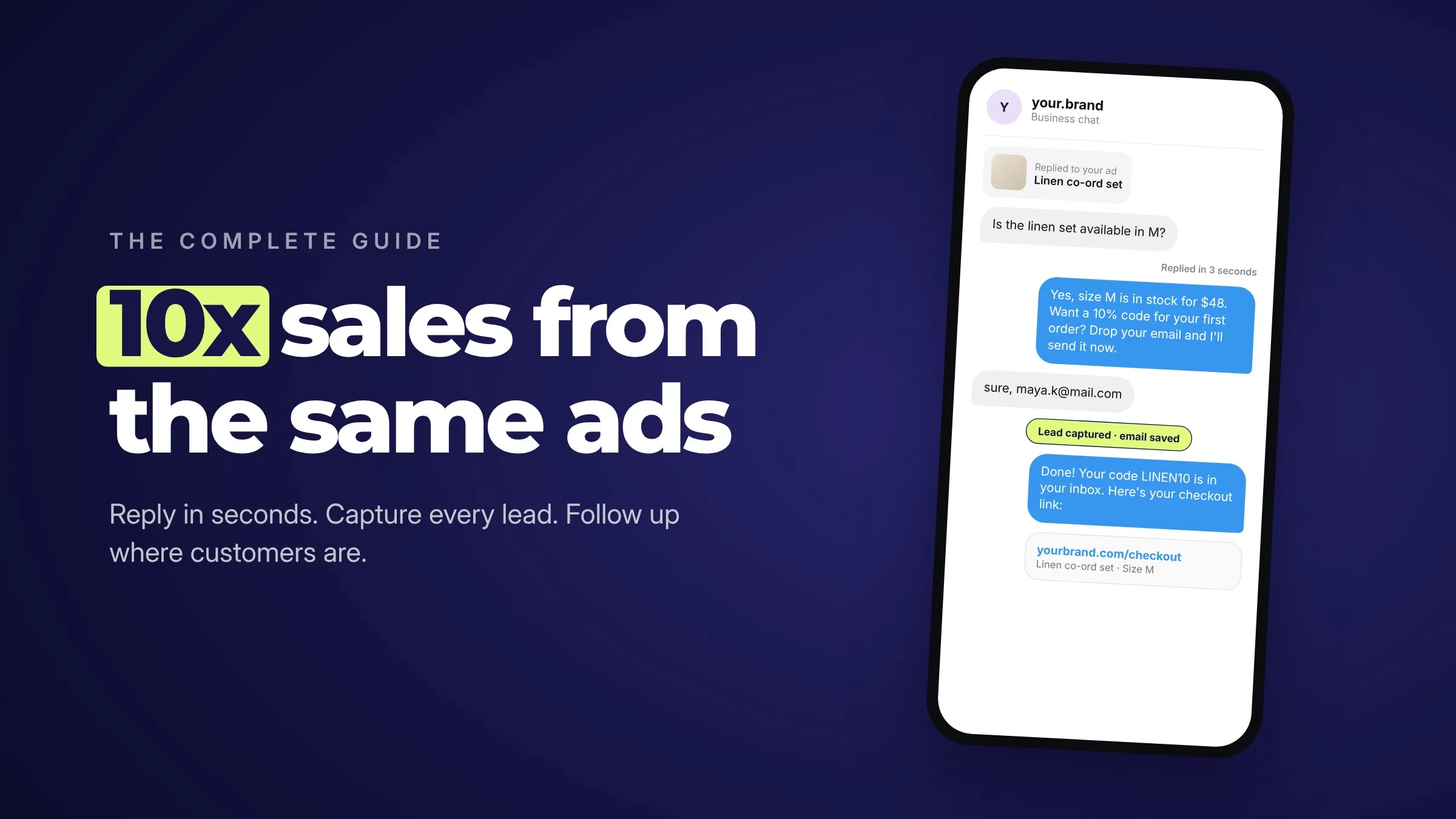
Running ads can be expensive, and most brands don't always see the return.
Whether you're new to Instagram advertising or already running Meta ads, the biggest gains usually come after the click, not before it.
This guide shows you how to 10x your sales from the same ads by making them work harder. We'll talk about leads and how to capture them, why speed matters, messaging rules across Instagram and WhatsApp, numbers you should track, and tips on how to turn interest into a sale.
Quick answer: how to get more sales from the same ads
To get more sales from Instagram and Facebook ads without raising your budget, fix what happens after the click. Reply to every DM within minutes, collect an email or phone number in the chat, and follow up across DMs, WhatsApp, email and retargeting ads. Then judge your ads by revenue per conversation, not cost per click.
- Use click-to-message ads so every tap starts a chat
- Reply in seconds, at any hour
- Answer the question first, then ask for an email or number
- Follow up inside each platform's messaging window
- Track response time, lead capture rate and revenue per conversation
Why your ads aren't converting
Most brands pay for ads, then lose the people who respond to them. The ad does its job: someone taps, sends a DM and asks a question. Then the lead quietly disappears.
It happens for three reasons:
- Nobody marks them as a lead. A DM sits in the inbox next to fan messages and spam. There's no list of who asked about what, so no one follows up.
- You have no email or phone number. Without contact details, Instagram is your only way back to them, meaning they are not captured.
- There's only one touch point. Most buyers need a few nudges before they pay. If a customer doesn't hear back fast enough on Instagram, they lose trust and interest, and are likely to buy from another brand.
The result: you pay for the click, the customer shows real interest, and the sale still goes nowhere.
Why sales happen in DMs now
Messaging is no longer a side channel. For a growing number of brands, the DM is the checkout conversation.
- People already message businesses at scale. Meta's head of business messaging has said that around a billion people a week talk to a business account across WhatsApp, Messenger and Instagram.
- Advertisers are moving budget to message ads. In the same interview, Meta said roughly 40% of its advertisers, more than 4 million, use click-to-message ads.
- The format is still growing fast. Meta reported that click-to-message ad revenue in the US grew more than 50% year over year in Q4 2025.
- AI is already answering those chats. Meta said its business AI tools handled about 10 million conversations a week by late March 2026, up from 1 million at the start of the year.
The takeaway: your customers expect to buy in the chat. If nobody answers properly, the ad still costs you, but the sale goes elsewhere.
Why reply speed decides whether your ads convert
Most businesses are slow to respond to customers. A Harvard Business Review study of 1.25 million online sales leads audited 2,241 US companies and found that only 37% replied to a new lead within an hour, and 23% never replied at all.
The first hour is the golden window. The same study found that companies that contacted a lead within an hour were 7 times more likely to qualify it than those that waited even an hour longer, and 60 times more likely than those that waited 24 hours or more.
Another study by MIT and InsideSales found that when companies contacted a lead within 5 minutes rather than 30, the odds of qualifying them were 21 times higher.
The benchmark to aim for: reply within 5 minutes. Within an hour is still good. After 24 hours, most leads have gone cold.
So a customer who messages you at 11 p.m. after seeing your ad expects an answer in minutes, not the next morning. Interest is highest right after the tap, and it fades fast.
Know your messaging windows
Platforms limit the time window for business to send a reply to a customer's messages. It's important to ensure your replies and follow-ups are being sent within these windows to avoid delivery issues or being flagged.
| Channel | How the window opens | How long you have | What you can send |
|---|---|---|---|
| Instagram and Messenger | Customer messages you | 24 hours | Any reply, including offers |
| Instagram and Messenger, from an ad | First message after tapping a Click-to-Direct or Click-to-Messenger ad | Up to 7 days from that message | Any reply, including offers |
| Instagram and Messenger, Human Agent tag | Customer's last message | 7 days | Manual replies by a person only, no promotions |
| Customer messages you | 24 hours (resets with each message) | Free-form replies, free of charge | |
| WhatsApp, from an ad | Customer taps an ad that clicks to WhatsApp | 72 hours free | All messages free, including templates |
| WhatsApp, outside the window | Business starts the chat | Anytime | Approved templates only, charged per message |
Sources: Meta's Messenger and Instagram messaging policy, Human Agent tag and WhatsApp Business pricing.
Three things to know:
- Ad-started chats have up to 7 days. As per Meta's messaging policy, if a customer clicks a Click-to-Messenger or Click-to-Direct ad, the window may last up to 7 days from their first message.
- The Human Agent tag lets a person on your team reply manually within 7 days. Using it to push offers breaks Meta's rules.
- WhatsApp charges for every message that uses a marketing template. However, replies inside the 24-hour customer service window and utility templates like order updates are free. Chats that start from an ad get a 72-hour free window.
This is why capturing an email or phone number matters. Once the window closes, using other methods can be important to get back to a customer.
How to run ads on Instagram and Facebook that start conversations
If you're learning how to advertise on Instagram, start with the ad type built for sales conversations.
A click-to-message ad replaces the "Shop now" link with a "Send message" button. Tapping it opens a chat with you on Instagram, Messenger or WhatsApp instead of a website.
Which ad type should you run?
Click-to-message ads aren't the only option. Each ad type sends people somewhere different after they tap, so pick the one that matches how your customers like to buy.
| Ad type | What happens when someone taps | Best for | Choose it when |
|---|---|---|---|
| Click-to-message (Instagram Direct or Messenger) | A DM opens with your business | Products people ask about before buying, like price, size, fit or stock | Customers usually have a question before they buy |
| Click-to-WhatsApp | A WhatsApp chat opens with your business | Markets where customers prefer WhatsApp, and repeat buyers | You want 72 hours of free messages and a channel for order updates |
| Lead ads (instant forms) | A short form opens inside Instagram or Facebook, already filled in with their details | Services, bookings, quotes and higher-priced items | You need contact details more than an instant sale |
| Website or sales ads ("Shop now") | People go straight to your website or product page | Simple products with a clear price | People don't need questions answered and your site converts well |
| Boosted post | A post from your feed is shown to more people | Quick reach and testing which content works | You're testing ideas on a small budget, not chasing sales |
A simple rule of thumb:
- If customers usually ask something before buying, run a click-to-message ad.
- If they just need to see the product and the price, run a website ad.
- If you sell a service or a high-ticket item, run a lead ad, and reply within minutes, because form leads go cold fast.
- Not sure? Run a click-to-message ad and a website ad side by side with the same budget, and compare cost per sale after a week or two.
Get the setup right before you worry about targeting:
- Pick the right objective. In Ads Manager, choose an objective such as Engagement, Leads or Sales, then set the conversion location to messaging apps.
- Choose one destination. Send people to the app your customers already use. Instagram Direct suits fashion and beauty; WhatsApp suits markets where people shop through WhatsApp.
- Write a greeting that starts the conversation. Add a short welcome message with 2 to 4 tap-to-send questions, like "Is this in stock?", "What sizes do you have?" or "How long is delivery?". One tap is easier than typing.
- Match the creative to the chat. If the ad shows a product, the first reply should be about that product, with its price and a link.
- Make the call to action conversational. "DM us your size and we'll check stock" beats a generic "Learn more".
Boost a post or use Meta Ads Manager?
Boosting is the quick option, and it's still a real ad. Boosting a post creates an ad through the same auction and billing as Ads Manager, but with fewer choices. On Instagram, one of the boost goals is getting more messages, so a boost can start conversations too.
Use a boost to test a post that's already doing well organically. Use Meta Ads Manager when you want to choose placements, test several versions of an ad, retarget people who messaged you, or send chats to WhatsApp.
Click-to-WhatsApp ads
In markets where people shop on WhatsApp, click-to-WhatsApp ads are often the better choice. The ad runs on Instagram or Facebook, and the "Send message" button opens a WhatsApp chat with your business. You can create them in Ads Manager or straight from the WhatsApp Business app.
Then the real work starts: answering every one of those messages fast, and keeping the lead once you have them.
How to turn every DM from your ads into a lead
The brands that hit 10x kept the same ads and changed what happens after someone messages. Here is the setup, step by step. It takes minutes.
- Connect your channels. Link Instagram, WhatsApp, Facebook and TikTok to a platform like Charle, so every message lands in one place.
- Enter your website URL. Charle reads your products, prices and policies, so it can answer real questions about sizes, stock, shipping and returns.
- Choose the post you're boosting. Tell Charle which ad or post is driving traffic, so it knows what people are asking about and which offer to mention.
- Let Charle reply in seconds. It answers customer questions any time of day, in your brand's voice, while interest is still high.
- Capture the email and phone number. In the conversation, Charle asks for contact details naturally, for example to send a discount code or an order update, and marks the person as a lead.
- Follow up where they're most active. With an email and phone number saved, you can reach customers on WhatsApp, by email or back in the DMs, instead of hoping they open Instagram again.
All your leads sit in one list, with what they asked about and where they came from. That list is what turns one ad click into several touch points.
Every touch point between the ad and the sale
A touch point is any moment a customer hears from you or reaches out to you. One ad click rarely closes a sale on its own. The brands that grow fastest plan a few touch points across the journey, so a curious tap turns into an order and then a repeat customer.
The two highlighted touch points, a fast reply and capturing contact details, are what make every later step possible.
What each touch point is for:
| Stage | Touch point | Its job |
|---|---|---|
| Discover | Click-to-message ad, organic post or Reel | Start a conversation instead of sending people to a page they'll bounce from |
| Discover | Comment or story reply | Turn public interest into a private chat |
| Ask | DM reply in seconds | Answer the question while interest is highest |
| Ask | Contact capture | Collect an email or phone number so you can reach them again |
| Decide | WhatsApp or DM follow-up | A helpful nudge inside the messaging window |
| Decide | Email or SMS flow | Reminders and offers once the chat window closes |
| Decide | Retargeting ad | Show the product again to people who messaged but didn't buy |
| Buy | Checkout link in the chat | Make paying one tap away |
| Come back | Order updates, review request, repeat offer | Build trust, collect proof and earn the next order |
You don't need all of them on day one. Start with fast replies and contact capture, then add follow-ups and retargeting.
Turn comments and story replies into conversations
Comments are buying signals hiding in public. "Price?", "Link?" and "Do you ship to Dubai?" are all customers asking to be sold to.
Instagram lets you answer them privately through its official Private Replies feature, with two limits:
- One private reply per comment. You get one message, so make it count: answer the question and ask one easy follow-up.
- Within 7 days of the comment. For Instagram Live, replies only work during the broadcast.
Once the person replies, the normal messaging window opens and the conversation can continue.
Ways to use it:
- Keyword posts. "Comment SIZE and we'll DM you the size guide." Every comment becomes a chat.
- Answer price and link questions privately. Reply publicly with "Sent you a DM!" so others see you respond, then send the details in the DM.
- Story replies. Treat a reply to your story like any DM: answer fast and offer the product link.
- Old posts that keep getting comments. Evergreen Reels collect comments for weeks. Make sure comments older than a few days still get answered, before the 7 days run out.
What to say: collecting emails and phone numbers without sounding pushy
People share contact details when they get something useful in return. Never open with "What's your email?". Answer the question first, then offer a reason to stay in touch.
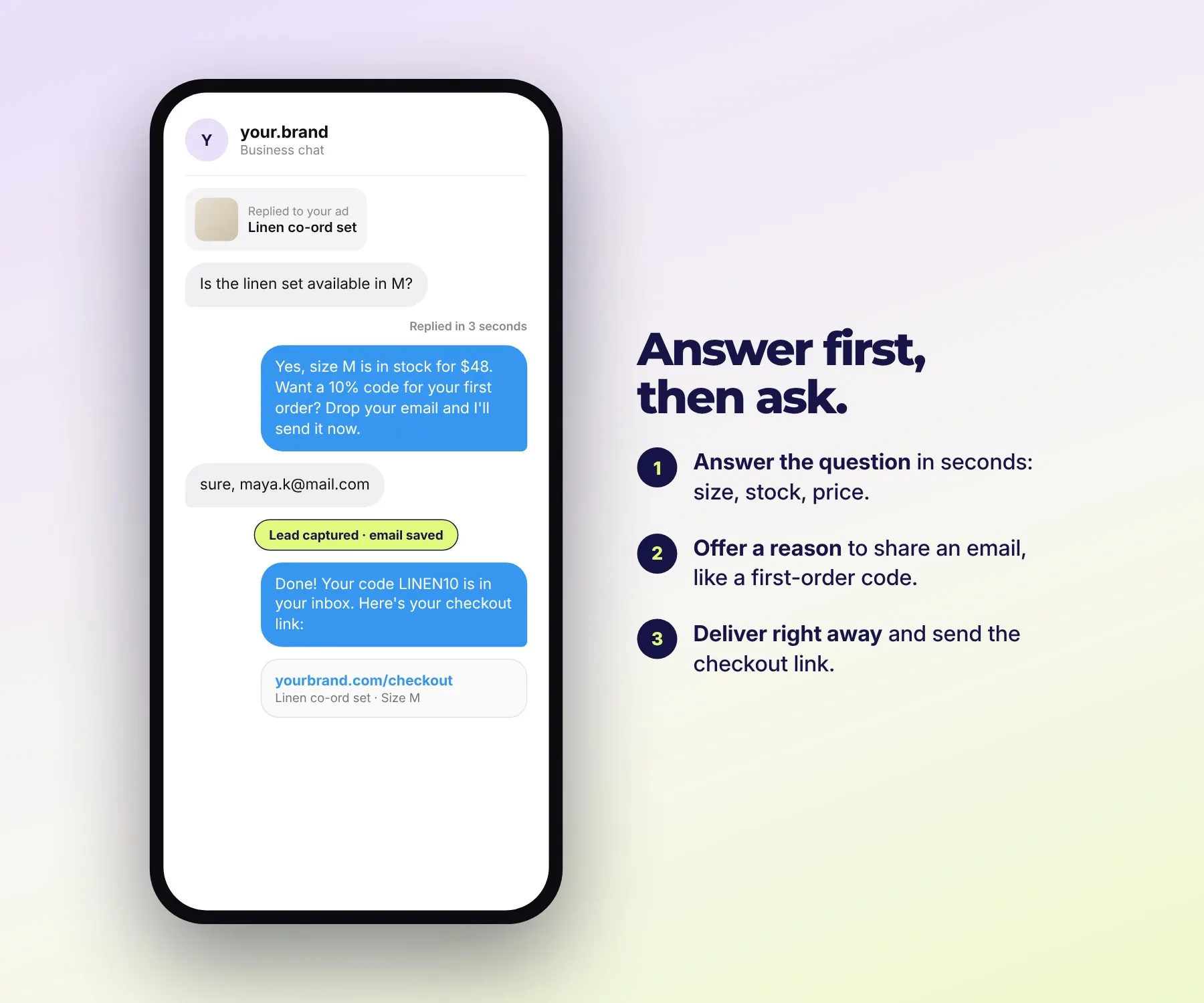
Good reasons to ask, with example lines:
| Moment | Example line |
|---|---|
| They ask about price | "It's $48. Want a 10% code for your first order? Drop your email and I'll send it now." |
| Their size is sold out | "Size M is back next week. Share your WhatsApp number and I'll message you the day it lands." |
| They're unsure about fit | "I can send you our size guide with real customer measurements. What's the best email?" |
| They're about to buy | "Great choice! What number should we use for delivery updates?" |
| They go quiet | "No rush. Want me to hold this in your size and send you a reminder tomorrow?" |
A few rules that keep it friendly:
- Answer first, ask second. The customer came with a question. Solve it before asking for anything.
- Ask for one thing at a time. Email or phone, not both in one message.
- Say what they'll get and when. "I'll send it now" or "the day it lands" builds trust.
- Get clear permission for marketing. Tell people you'll send offers, and make it easy to opt out. Rules vary by country, so check what applies where you sell.
Your follow-up plan
Most people won't buy in the first chat. Online shoppers abandon about 70% of carts, according to Baymard Institute's average of 50 studies, and DMs are no different. The sale usually comes from the second or third touch.
A simple sequence that respects the messaging windows:
| When | Channel | What to send |
|---|---|---|
| Within seconds | Same chat | Answer the question, share the product link, offer the code or reminder |
| Within the hour | Same chat | If they went quiet: one helpful nudge, like a size tip or a customer photo |
| Day 1 | Email or WhatsApp | The code or guide you promised, with a direct link to checkout |
| Day 2 to 3 | Same chat (inside the window) | A short reminder: stock is low, the code expires soon, or a review of the product |
| Day 5 to 7 | A last friendly check-in, then stop |
Keep every message useful, short and personal. One clear message beats five pushy ones, and nobody wants a brand that won't stop texting.
Bring quiet leads back with retargeting ads
People who message you are some of your warmest prospects. Even without their email, you can still reach them again with ads.
Meta lets you build a custom audience of people who messaged your Facebook Page or Instagram business profile. Its engagement audience options include people who sent a message to your Page and people who messaged your Instagram business profile. Note: These two options aren't available to advertisers in Europe, or to any campaign that targets people in Europe.
How to use it:
- Create the audience. In Ads Manager, create a custom audience from your Instagram account and choose people who sent a message.
- Exclude buyers. Remove recent customers so you only pay to reach people who haven't ordered.
- Show what they asked about. A short ad with the product, a review and the same offer from the chat works better than a generic brand ad.
- Send them back to the chat. Use another click-to-message ad, so the conversation picks up where it left off.
Email and SMS flows that close the loop
Once you have an email or phone number, automated flows keep working after the DM window closes. A flow is a message sent automatically when something happens, like a cart left behind.
The numbers show why they're worth setting up. In Klaviyo's 2026 abandoned cart benchmarks, based on more than 110,000 customers, abandoned cart flows earned an average of $6.77 per recipient by email and $4.48 by text. The top 10% of brands reached $13.70 and $8.69.
Flows worth building from DM leads:
- Welcome: sends the code or guide you promised in the chat.
- Abandoned cart: reminds people who clicked the checkout link but didn't pay.
- Back in stock: messages people the day their size returns.
- Win-back: a friendly check-in for customers who haven't ordered in a while.
Keep the tone of the DM. The email should read like it came from the same person who answered their question.
After the sale: reviews, repeat orders and referrals
The first order is the most expensive one you'll ever win. Every touch point after it costs almost nothing, and it's where 10x becomes lasting growth.
- Order updates. Confirmations and delivery updates are the messages customers actually want. On WhatsApp, utility messages like these are free inside an open customer service window.
- Review request. A few days after delivery, ask for a short review or a photo. Use the best ones in your next ads and in your DM replies.
- Repeat offer. For products people reorder, like skincare, coffee or supplements, send a reminder around when they're likely to run out.
- Referral. Give happy customers a code to share with a friend. A recommendation in a group chat is the warmest lead you can get.
Each of these starts or continues a conversation, which brings the customer back to the top of the journey.
The math: how small fixes add up to 10x
10x sounds like magic, but it's usually three ordinary fixes multiplying each other: answer everyone, answer fast, and follow up. Here is an illustrative example for a brand getting 1,000 DMs a month from the same ads. The numbers are made up to show the mechanics, not taken from a client.
| Step | Before | After |
|---|---|---|
| DMs from ads | 1,000 | 1,000 |
| Answered within the hour | 200 (20%) | 1,000 (100%, in seconds) |
| Sales in the first chat | 20 (10% of answered) | 120 (12% of answered) |
| Emails or numbers captured | 0 | 400 (40%) |
| Sales from follow-ups | 0 | 80 (20% of captured) |
| Total sales | 20 | 200 (10x) |
Notice where the jump comes from. Answering every message brings five times as many real conversations. Follow-ups then add sales that would have been lost completely. Your own numbers will differ, so measure your starting point first (next section).
Metrics to track every week
Cost per click doesn't tell you whether the DMs are turning into money. Track these instead, in this order:
| Metric | What it tells you | How to calculate |
|---|---|---|
| First response time | How fast customers hear back | Average time from their first message to your first reply |
| Reply rate | How many DMs get answered at all | Answered conversations ÷ total conversations |
| Lead capture rate | How many chats you can follow up later | Emails or numbers collected ÷ conversations |
| Cost per conversation | What each chat costs you in ads | Ad spend ÷ conversations started |
| Conversation-to-sale rate | How well chats turn into orders | Orders from DMs ÷ conversations |
| Revenue per conversation | What each chat is worth | Revenue from DMs ÷ conversations |
If revenue per conversation is higher than cost per conversation, every extra DM is profit. That's the number that tells you when to raise your ad budget.
Before and after
Same ads, same budget. The difference is what happens after the DM.
| Before | After Charle | |
|---|---|---|
| Reply time | Hours, or the next morning | Seconds, any time of day |
| Lead tracking | Lost in the inbox | Marked as a lead, in one list |
| Contact details | None | Email and phone number saved |
| Follow-up | Instagram only, if they reply | WhatsApp, email and DMs |
| Channels | Checked one app at a time | Instagram, WhatsApp, Facebook and TikTok in one inbox |
Your checklist
- Connect every channel your ads send people to
- Add your website URL so answers are accurate
- Select the post or ad you're boosting
- Add a greeting with 2 to 4 tap-to-send questions to your click-to-message ads
- Give people a reason to share their email or number, like a discount code
- Plan follow-ups inside each channel's messaging window
- Reply to every new lead within 5 minutes, then follow up within a day on the channel they use most
- Track response time, lead capture rate and revenue per conversation weekly
Common mistakes that waste ad spend in DMs
- Using tools that ask for your Instagram password. Unofficial tools put your account at risk. Use tools that connect through Instagram's official login.
- Asking for an email before answering. It feels like a form, not a conversation, and people leave.
- Canned replies that ignore the question. "Thanks for reaching out!" with no answer is worse than no reply at all.
- Replying only during office hours. Ad traffic peaks in the evening and on weekends, exactly when teams are offline.
- Pushing offers outside the messaging window. Messages won't send, and misusing tags like Human Agent breaks Meta's rules.
- Not tagging where a lead came from. If you can't see which ad started the chat, you can't tell which ads make money.
- Following up too often. One or two helpful messages work. Daily promos get you muted or blocked.
FAQ
Is Instagram DM automation safe?
Yes, when you use the official route. Charle is approved by Meta and connects through Instagram's official login, so you never share your password. To compare the options, see our guide to the best AI Instagram DM automation tools.
Which channels does Charle work with?
Instagram, WhatsApp, Facebook and TikTok, all managed from one inbox.
How long does Charle take to set up?
Minutes. Connect your channels, enter your URL and choose the post you're boosting.
Do I need to spend more on ads?
No. The point is to get more sales from the ads you already run, by answering faster and following up with every lead.
Should I tell customers they're chatting with AI?
Yes. Being upfront builds trust, and some places legally require businesses to disclose when a customer is talking to a chatbot. A short opener like "Hi, I'm the yourstore assistant" is enough. What customers care about most is a fast, accurate answer, and that's where AI helps: Charle replies in your brand's voice using your own products and policies, and you can review conversations and step in at any time.
How long can I reply to someone who messaged from my ad?
On Instagram and Messenger, Meta's policy gives chats started from a Click-to-Direct or Click-to-Messenger ad a window of up to 7 days from the customer's first message. Other DMs get 24 hours.
Does WhatsApp cost money to reply?
Replies inside the 24-hour customer service window are free. Chats that start from an ad that clicks to WhatsApp get 72 hours of free messages. Marketing templates you send later are charged per message.
Can I message people who never contacted me?
Not in Instagram DMs. Brands can only reply to people who reached out first. That's why capturing an email or phone number, with permission, is so valuable.
Which matters more, better ads or better replies?
Start with replies. Fixing response time and follow-up raises the return on every ad you already run, before you spend more.
How do I run ads on Instagram?
Connect your Instagram professional account to a Facebook Page and set up your Facebook ads account, then create a campaign in Meta Ads Manager or boost a post from the Instagram app. For sales from DMs, choose a goal that starts conversations and set the destination to Instagram Direct or WhatsApp.
How much do Instagram and Facebook ads cost?
There's no fixed price. Meta ads run on an auction, so cost depends on competition for your audience, the quality of your ad and the goal you choose. That's why the cheapest wins usually come from converting more of the clicks you already pay for.
Why are my Instagram ads not converting?
Often the ad is fine and the follow-through is the problem: slow replies, no answer to the question asked, or no way to follow up later. Check your first response time and reply rate before you change the creative.
Are Facebook ads worth it for small businesses?
Small business ads on Facebook and Instagram can pay off, if you track what happens after the click. Measure revenue per conversation against cost per conversation. When the first is higher, more ad spend means more profit.
Should I boost a post or use Meta Ads Manager?
Boost to test a post that's already performing. Use Ads Manager when you need more control: placements, multiple ad versions, retargeting or click-to-WhatsApp.
Make your ads work harder
You're already paying for the attention. Charle makes sure every person who messages gets an answer in seconds, becomes a lead you can reach again, and gets followed up until they buy.
Start your 14-day free trial or book a free consult.
More guides
Sources
- The Short Life of Online Sales Leads, Harvard Business Review, March 2011
- 50% of sales go to the vendor that responds first, Fronetics, summarising the MIT and InsideSales lead response study
- Why Meta is investing big in business messaging, AdExchanger interview with Meta's VP of business messaging
- 2026: AI Drives Performance, Meta Newsroom, January 2026
- Meta says its business AI now facilitates 10 million conversations a week, TechCrunch, April 2026
- Messenger Platform and IG Messaging API policy, Meta for Developers
- Send a Private Reply to a Commenter, Meta for Developers
- Engagement Custom Audiences, Meta for Developers
- Pricing on the WhatsApp Business Platform, Meta for Developers
- What Is a Boosted Post? Boost vs Ads Manager, Relevant Audience, October 2026
- Cart abandonment rate statistics, Baymard Institute, updated September 2025
- 2026 abandoned cart flow benchmarks, Klaviyo